
Tag: marketing tools

  • AI marketing tools for 2026: compare content, automation, and creative options

    AI marketing tools for 2026: compare content, automation, and creative options

    AI marketing isn’t one magic platform. The practical AI marketing tools for 2026 are specialised tools that help with writing and repurposing content, automating workflows, and creating design and video assets. They speed up defined tasks; they don’t replace the judgement needed to set strategy or approve the work.

    The appeal is clear: less repetitive work and more time for decisions that move marketing forward. But adding tools without giving each one a clear role can create complexity rather than remove it.

    This guide compares the main options so you can match a tool to the work you need done. You’ll learn where writing, automation, design and video tools can help, where human review matters, and how to choose a practical starting point. No hype, just a clearer way to build a setup around your team’s priorities.

    Key Takeaways

    • Match each AI tool to a specific job, such as drafting, workflow automation or creative production, rather than adding platforms without a clear purpose.
    • Use AI to build a first draft or repurpose existing material, then apply human judgement to keep the content relevant and credible.
    • Set clear instructions and review points for automated workflows before expanding them across more marketing tasks.
    • Choose design and video tools around the assets your team needs to produce, and keep creative decisions aligned with your brand.

    AI-assisted long-form writing and content repurposing

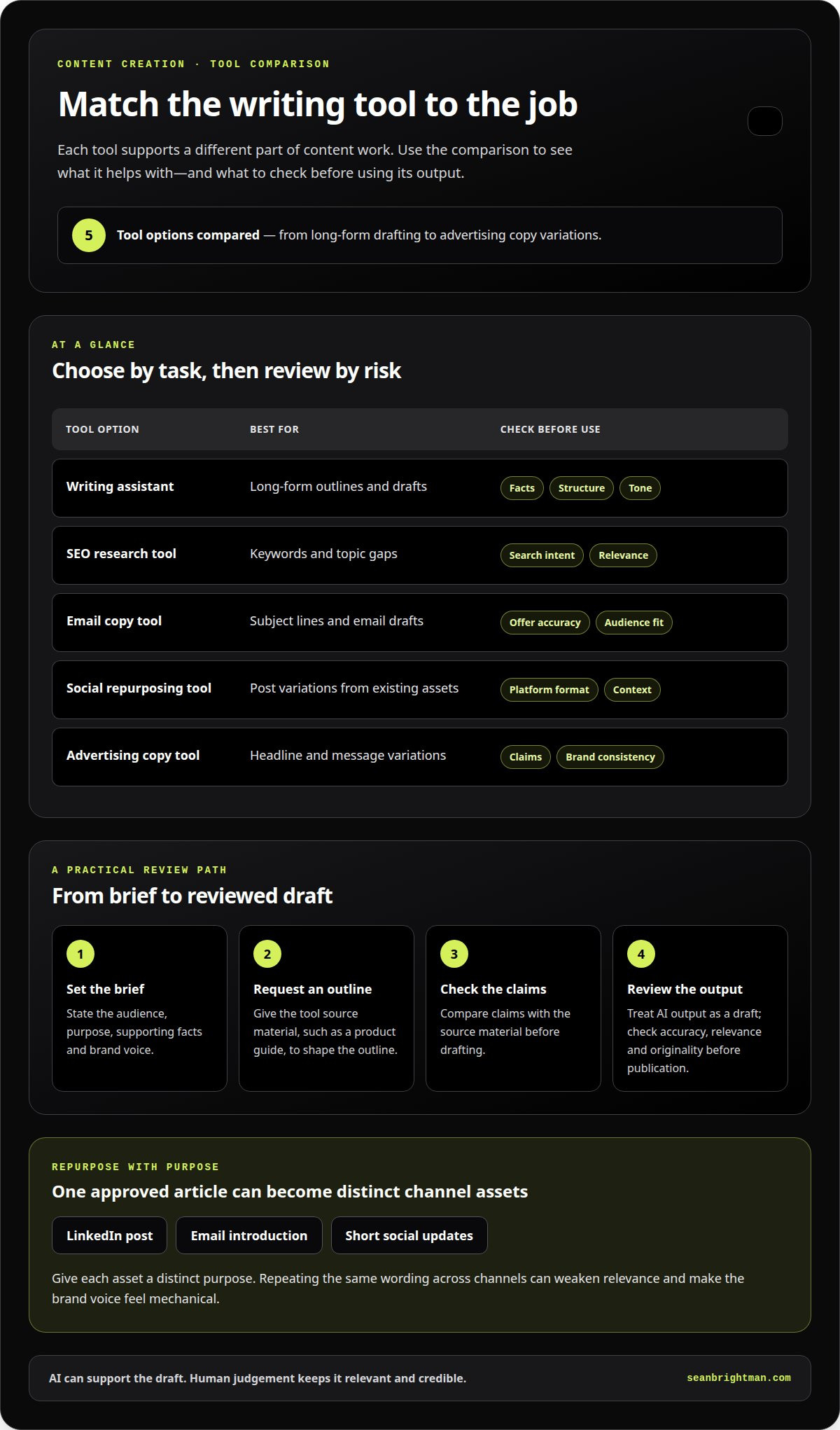
    For content creation, use writing assistants for outlines and drafts, SEO tools for keyword research, and dedicated tools for email, social posts and advertising copy. Each serves a different purpose: a search-led article needs structure and evidence, while an email needs a clear offer and next step.

    Start with a brief that sets out the audience, purpose, supporting facts and brand voice. Ask the tool for an outline, then check its claims against your source material before drafting. For example, provide a product guide and request a comparison article outline, rather than unsupported product claims.

    SEO tools can group related keywords, surface search questions and flag missing subtopics. Use these findings to shape your content strategy, not as a prompt to repeat a keyword in every paragraph. Check recommendations against search intent, then add original examples and expertise to make the page useful.

    Tool option Best for Check before use
    Writing assistant Long-form outlines and drafts Facts, structure and tone
    SEO research tool Keywords and topic gaps Search intent and relevance
    Email copy tool Subject lines and email drafts Offer accuracy and audience fit
    Social repurposing tool Post variations from existing assets Platform format and context
    Advertising copy tool Headline and message variations Claims and brand consistency

    Repurpose an approved article into a LinkedIn post, an email introduction and several short social updates. Give each asset a distinct purpose. Repeating the same wording across channels can weaken relevance and make your brand voice feel mechanical.

    Risks include factual errors, biased wording and material that resembles existing work. Check claims against reliable sources, look for stereotyping in examples, and assess originality before publication. Treat AI output as a draft, not proof that content is accurate or safe to use.

    Start with your bottleneck: use SEO research if topic planning is weak, or a writing assistant if drafting is slow. Keep a human review step between generation and publication.

    AI marketing automation and workflow management

    Automation tools range from focused email personalisation to platforms that link customer records, campaigns and follow-up tasks. Choose based on workflow complexity, integration needs and the human checks each process requires.

    Email personalisation and automation

    Email tools use customer segments and campaign behaviour to tailor messages, schedule sends and trigger follow-ups. Unlike broader platforms, they focus on inbox engagement rather than coordinating every customer touchpoint. A small retailer might send a relevant product email after a purchase, with a review step to check accuracy and tone.

    For UK campaigns, design data handling around UK GDPR and PECR, including lawful data use, consent and marketing preferences. Make sure suppression preferences apply to every automated send.

    CRM and campaign automation

    CRM automation links customer records with email and campaign activity. A visit to a landing page, for example, could trigger a relevant follow-up and update the customer’s record. Unlike email-only automation, CRM automation coordinates information across the customer journey. Tools may connect with Shopify, HubSpot, Salesforce or WordPress through specific integrations, so map the required data flows before choosing one.

    Measure results against a baseline, using qualified leads, conversions and revenue attributed to the campaign. A comparison group can help distinguish campaign impact from other changes.

    Marketing workflow automation

    Workflow tools connect steps across marketing tasks, such as turning an approved blog post into a review task and routing images and copy for publication. Unlike CRM automation, they focus on hand-offs between processes. Set clear instructions, assign approval points and test each path before scaling. AI agents can assist with repetitive steps, while strategic judgement remains important.

    A small UK business can pilot one workflow, track time saved and error rates, then decide whether to expand it.

    Marketing automation platforms

    Platforms that combine campaign management, customer data, email and reporting can require more setup than a focused tool. Test ease of use with a real task, such as segmenting contacts and scheduling a campaign. Claude may help draft workflow instructions, but the platform’s features and integrations determine what it can actually do.

    Free plans and paid tiers vary by platform, features and usage. Assess value through adoption and measured outcomes, not the feature list alone. A market estimate suggests AI-driven personalisation can produce three times higher email response rates; measure performance against your own baseline.
    AI marketing tools for 2026: compare content, automation, and creative options

    Short-form video and creative asset generation

    Creative tools turn existing footage, product information and campaign briefs into video, images and advertising drafts. They can speed up asset creation, but the output still needs editing for accuracy, pacing and brand fit. Start with one approved source asset and define its audience, channel and intended action.

    A 45-minute podcast can be turned into six polished short-form clips in under thirty minutes using video-production tools. That gives a team several drafts to review, not six finished campaign assets. Check each clip’s context, captions, opening and ending before publishing.

    For image and graphic generation, describe the subject, format, visual style and intended placement. A product launch brief might specify a square social graphic and a separate website banner. Manually check generated text, colours and product details, especially where an image could misrepresent the item.

    AI advertising tools can generate alternative headlines, layouts and calls to action from a campaign brief. For example, draft versions focused on product benefits, customer needs and seasonal relevance. Compare them against the same campaign objective, and remove any claims the business can’t substantiate.

    Video tools can assemble clips, add subtitles or suggest edits from a script. Use them for repeatable production tasks, such as cutting a product demonstration into shorter formats. Keep a human editor responsible for timing, pronunciation, visual accuracy and the final decision about what gets published.

    Google campaign assets need the same scrutiny as social creative. Check that generated headlines match the landing page and images represent the offer accurately. A mismatch can undermine the message after someone clicks, even if the creative looks polished.

    Choose a tool based on the asset bottleneck. If filming is in place but editing slows production, test a video tool on one source recording. If design takes too long, test image generation against a real brief. Compare the manual editing required, consistency across drafts and usefulness of the final output.

    AI-assisted design and video generation

    Design and video tools can turn a brief into visual drafts, scripts and social media versions. Capabilities vary, so distinguish asset creation from final production. For a product launch, use one brief to draft a campaign graphic, a short video script and platform-specific layouts. Then check whether the output fits the audience and brand.

    Start with clear inputs: the message, audience, channel and required format. Request a square social post and a landscape landing-page visual as separate versions. Check text placement, colours and product details against the original brief. AI can speed up iteration, but a human editor should make the final choices.

    Everyday marketing assistants can handle smaller tasks in the creative process. They can turn meeting notes into a task list, draft a social media caption or summarise campaign analysis. Set a clear outcome for each request. For example, ask for three caption options based on an approved offer, rather than a complete campaign plan.

    Grammar and style assistants can flag spelling errors, unclear phrasing and inconsistent tone in a draft. Use them after writing, not as a substitute for subject knowledge. Check every edit against the intended meaning: a tool might smooth a sentence while changing a product claim or removing a phrase that matters to your brand voice.

    Keep the workflow simple: brief the tool, generate a draft, review facts and visual details, then edit for the channel and tone. Save the approved version as a reference for later assets. This gives you a clear comparison point if a new design or script changes the message.

    If your team is choosing between creative tools and needs a joined-up plan, map your AI marketing priorities before adding another platform.

    Sean Brightman

    Sean Brightman helps businesses turn AI marketing choices into a clear plan through AI Consulting and Roadmapping. This support is useful when tool experiments are multiplying, teams lack priorities or automation isn’t tied to a defined marketing goal.

    AI Consulting provides strategic guidance on where AI fits into your marketing operation and which challenges deserve attention first. Roadmapping creates a structured plan for setting priorities and sequencing next steps. For ongoing strategic input as your plans develop, an Advisory Retainer provides continued direction and accountability.

    The aim isn’t to add tools for the sake of it. It’s to build a workable approach around your objectives, team and existing processes. Contact Sean Brightman to discuss your AI marketing priorities.

    Make your next AI move count

    The next step isn’t another tool trial. It’s deciding which marketing decision or process needs to improve, then aligning your people, data and technology around that outcome. That gives your team a clearer basis for choosing practical AI marketing tools for 2026, and for judging whether they belong in your operation.

    Sean Brightman offers Fractional CMO support, AI Consulting and Roadmapping to bring strategic direction to this work. These services are a fit when you need senior marketing leadership, clearer priorities or a structured plan for applying AI to business goals.

    Bring the challenge you need to solve, not a platform you’ve already chosen. A focused conversation can clarify your next move and where to direct your attention.

    Contact Sean Brightman to discuss your needs and take the next step with purpose.

    Frequently Asked Questions

    What Is AI for Marketing?

    AI for marketing uses software to analyse information, generate material or support decisions across marketing tasks. For example, a team might group customer feedback by theme, then use those findings to shape a campaign brief. The tool processes patterns or instructions; people set the objective, judge relevance and take responsibility for the final decision.

    What are the best practical AI marketing tools for UK businesses in 2026?

    The right choice depends on the task your business needs to improve, not a universal ranking. A small team planning campaigns might prioritise a writing assistant, while a business managing repeat customer journeys might need CRM-connected automation. Before choosing, define the task, identify who will use the tool and decide how you’ll measure whether it improves the work. Start with fit, not features.

    How do leading AI marketing platforms compare on features and ease of use?

    Writing assistants support outlines and drafts, SEO tools help with keyword research and topic gaps, and automation platforms connect campaigns, customer data and workflows. Test ease of use with a real task, such as segmenting contacts and scheduling a campaign.

    What measurable results and case studies show AI marketing tools improve ROI?

    A market estimate suggests AI-driven personalisation can produce three times higher email response rates. Measure performance against a baseline using qualified leads, conversions and attributed revenue; a comparison group can help isolate campaign impact.
  • Compare marketing automation platforms by features

    Compare marketing automation platforms by features

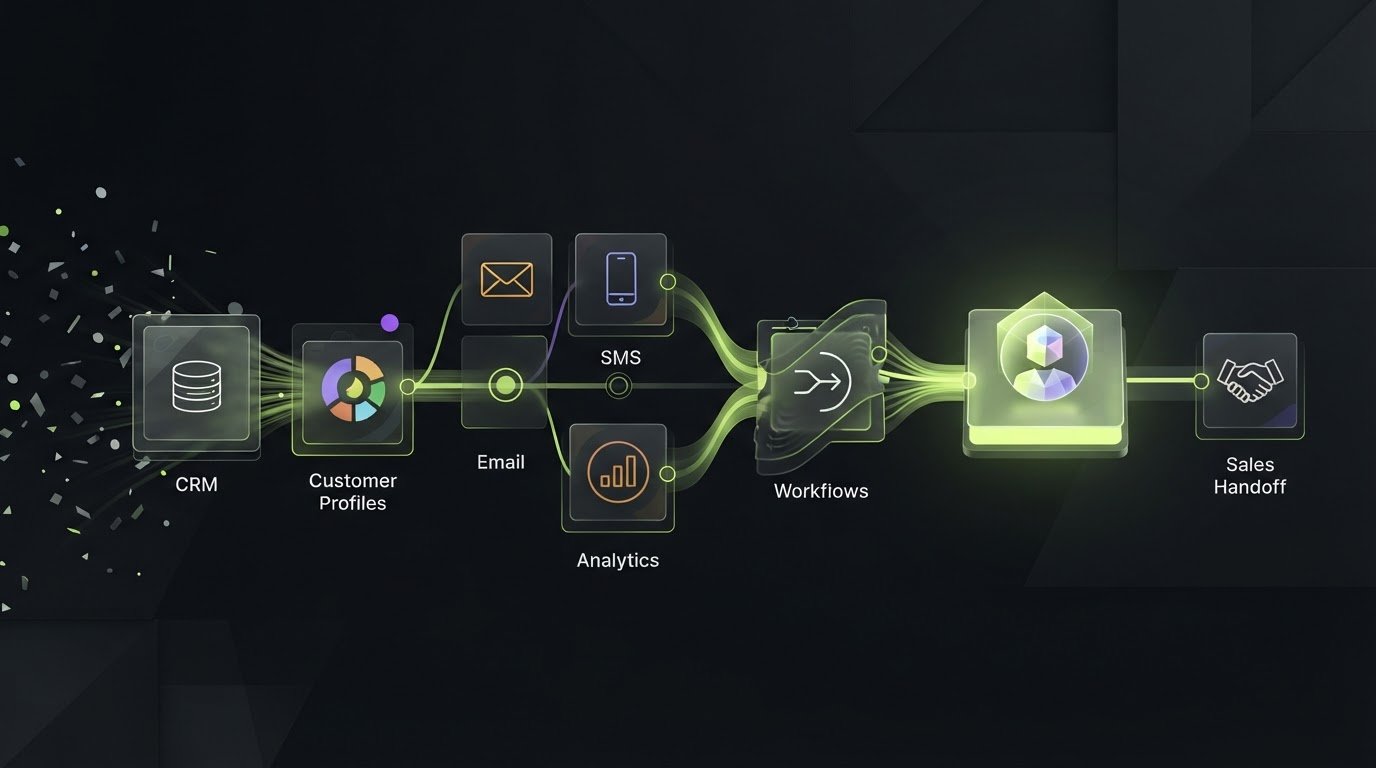
    The platform with the longest feature list isn’t automatically the best fit. To work out how to choose a marketing automation platform, start with the job it needs to do: assess funnel coverage, customer profiles, email and SMS tools, and connections to your existing systems. Choose one that supports your workflow without adding complexity you won’t use.

    It’s easy to focus on campaign features and overlook what happens behind the scenes. Automation only helps when customer information moves cleanly between marketing and sales, and people still need to guide leads towards a decision.

    This comparison explains what marketing automation tools do and how their capabilities differ, from channel-specific tools to full-funnel platforms. It covers integrations, data consolidation, email and SMS automation, usability and room to grow, helping you compare options against real needs rather than a flashy feature list.

    Key Takeaways

    • Match the platform’s scope to the work you need done, from channel-specific campaigns to full-funnel automation.
    • Prioritise a clean CRM connection so customer information and leads can move between marketing and sales.
    • Compare how each option brings customer data together to support useful, joined-up profiles.
    • Look beyond email and SMS sending: assess how each platform handles workflows, integrations and future growth.
    • Use your team’s needs and intended use to narrow the shortlist, not the size of a platform’s feature list.

    What are marketing automation tools?

    Marketing automation tools run repeatable campaigns, messages and lead-nurture steps. They range from standalone platforms to marketing modules within CRM systems. Compare how each connects your tools and moves leads towards sales.

    CRM integration and sales alignment

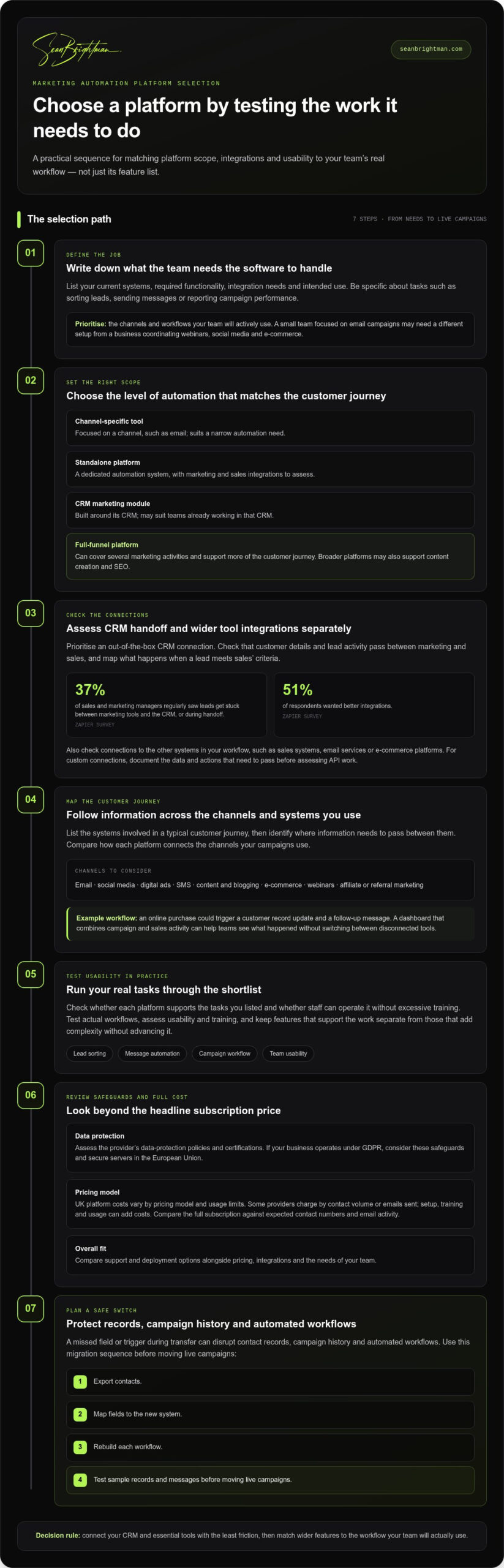
    A CRM integration passes lead activity and customer details between marketing and sales, helping both teams work from shared information. A Zapier survey found that 37% of sales and marketing managers regularly saw leads get stuck between marketing tools and the CRM, or during the handoff. Prioritise an out-of-the-box connection with your CRM, then map what happens when a lead meets your sales team’s criteria.

    Marketing automation can improve coordination, but it doesn’t replace people nurturing leads or converting them. A salesperson needs to see which campaign prompted a response, while marketing needs a clear signal when sales takes over. Compare the quality of this handoff, not just whether CRM integration appears on a feature list.

    Marketing and sales tool integrations

    Broader integrations connect campaigns with the tools your teams already use, such as sales systems, email services or e-commerce platforms. This differs from CRM alignment: the CRM connection supports the lead handoff, whilst other integrations let campaign data and actions move across the wider workflow. In a Zapier survey, 51% of respondents wanted better integrations.

    List the systems involved in a typical customer journey, then identify where information needs to pass between them. An online purchase, for example, could trigger a customer record update and a follow-up message. A dashboard combining campaign and sales activity can help teams see what happened without switching between disconnected tools.

    Option CRM integration Connected tools Best fit
    Standalone platform Often central to evaluation Marketing and sales integrations Teams needing a dedicated automation system
    CRM marketing module Built around its CRM Often tied to the CRM ecosystem Teams already working in that CRM
    Channel-specific tool Connection needs assessing Focused on a channel, such as email Teams with a narrow automation need
    Full-funnel platform Supports broader coordination Can cover several marketing activities Teams managing more of the customer journey

    Choose the option that connects your CRM and essential tools with the least friction, then match its wider features to your workflow.

    UK platform costs vary by pricing model and usage limits. Some providers charge by contact volume or emails sent, while setup, training and usage can add costs. Compare the full subscription against expected contact numbers and email activity, not just the headline rate.

    Switching can disrupt contact records, campaign history and automated workflows if a field or trigger is missed during transfer. Export contacts, map fields to the new system, rebuild each workflow, then test sample records and messages before moving live campaigns.

    For connections beyond standard integrations, assess API access. An API can let your organisation link the platform with another app later. Before comparing custom integration work, document the data and actions that need to pass between systems.

    Marketing automation features

    Compare what each platform automates, which channels it covers, and how its features support your customer journey. Software your team can use in its actual workflow matters more than a long feature list.

    Automation across marketing channels

    Channel-specific tools focus on tasks such as creating and sending marketing emails. Middle- or bottom-funnel platforms focus on capturing leads and sending messages, while full-funnel platforms may also support content creation and SEO to build interest. The key difference is scope: a platform may serve one channel or connect activity across the journey.

    Map the channels your campaigns use, then compare how each marketing automation tool links them. Automation may span email, social media, digital ads, SMS, content, blogging, e-commerce, webinars and affiliate or referral marketing. An e-commerce workflow, for example, might connect an online interaction with a follow-up message. Prioritise channels your team will actively use.

    Features matched to business needs

    Match features to your existing systems, required functionality, integration needs and intended use. A small team focused on email campaigns may need a different setup from a business coordinating webinars, social media and e-commerce. Compare platforms against those tasks instead of treating every available feature as essential.

    Write down the tasks you want software to handle, such as sorting leads, sending messages or reporting campaign performance. Check whether the platform supports them and whether staff can operate it without excessive training. This practical test separates useful functionality from features that add complexity without advancing your workflow.

    For a small business in the UK, prioritise essential channels, manageable workflows and features suited to the team’s intended use. A focused tool may fit narrower needs, while broader platforms offer more funnel coverage and room to scale.

    Assess the provider’s data-protection policies and certifications, and consider secure servers in the European Union. Businesses operating under GDPR should review these safeguards when comparing platforms.

    Shortlist platforms by documenting your current systems, required features, integration needs and intended use. Test the shortlist against real workflows, assess usability and training, then compare support, deployment options and pricing before choosing.

    Finally, test how reporting connects activity to outcomes. Campaign reporting can help teams assess performance, while A/B testing compares two options to identify which better suits the audience. Check whether the platform can scale as users, communications and business activity grow. A feature that works for one campaign should also fit the wider operation.

    Customer data consolidation and 360-degree profiles

    A useful 360-degree profile brings sales and marketing information together, giving teams a clearer view of customer activity. In 2026, the best platform for your business is the one that unifies the data you use and supports the work your teams need to do.

    Unified sales and marketing data

    Look for a platform that brings customer details and interactions from sales and marketing together. A profile might combine email engagement, campaign responses and sales notes, giving teams a view across channels. What matters is how clearly the platform connects those records, not simply how many fields it can store.

    Test a practical journey: a prospect opens an email, visits a product page and speaks with sales. Check whether the profile connects those interactions and gives each team relevant context. For a commerce business, viewing purchase activity alongside marketing engagement can help teams understand how a customer reached a decision.

    Compare analytics and profile tools by asking what teams can do with the unified view. Can marketers segment audiences by engagement? Can sales see which emails or campaigns are relevant to a conversation? A platform that consolidates data but leaves teams unable to act on it offers storage, not a useful customer view.

    Platform support

    Customer support helps teams resolve platform issues and learn its features. Compare available channels, such as telephone, email and support tickets, and find out whether experts can help with technical problems. Support won’t build a customer profile, but it can help staff use the platform and troubleshoot a broken workflow.

    Training matters too. Check whether corporate training comes with the subscription or can be added, and consider how much guidance staff need to manage segments, emails and analytics. A platform with extensive features may require more learning than a focused tool. Match the support model to your team’s experience and planned work.

    Customer reviews and testimonials can offer evidence about how a platform performs in practice. Look for feedback relevant to your team’s size, use case and required integrations. A review about email campaigns may reveal little about consolidating sales and commerce data, so assess feedback against your specific requirements.

    Look for recurring details in reviews, not isolated praise or criticism. Repeated reports of confusing analytics or slow support, for example, may flag issues relevant to your evaluation. Balance reviews with product demonstrations and a trial using sample records. Check how the platform handles duplicate contacts, missing fields and changes to customer details.

    Use the same comparison for every shortlisted platform: profile completeness, data sources, analytics, support channels, training and customer feedback. Ask staff from sales and marketing to assess the same sample journey, then record where each platform gives them useful context. This makes differences visible without mistaking a polished dashboard for a complete customer view.

    Choose the platform that turns connected customer information into useful context for both teams, with support and training suited to the work ahead.

    Compare marketing automation platforms by features

    Email and SMS automation

    Email automation can create and send marketing emails, while SMS adds another channel to the customer journey. Compare what each platform can coordinate instead of treating message volume as the whole job.

    Deliverability and spam risks

    Deliverability is whether an email reaches its intended inbox. Unsolicited emails may be treated as spam, damaging the sending IP address’s reputation and future deliverability. Audience selection and message relevance are therefore operational requirements, not optional refinements. Check how a platform handles contact permissions, audience segments and suppression lists before building automated sends.

    Test a real workflow before launch. Preview a purchase follow-up, for example, confirm the intended audience and inspect the message on different devices. Templates can speed up campaign creation, but still need accurate content and a relevant recipient list. Review sending and engagement reports after a campaign, then adjust the workflow if results show a mismatch.

    Consent requirements

    UK GDPR and PECR affect how businesses manage personal data and electronic marketing. Build automation around clear records of contact permissions and preferences, and ensure workflows respect changes such as an opt-out. This is separate from deliverability: an email reaching an inbox doesn’t establish that the recipient should receive it.

    Before activating a sequence, map where contact details came from, which preferences apply, and how suppression updates reach each channel. Keep those records connected to the relevant contact so a later email or SMS doesn’t ignore a changed preference. The platform should support your processes; automation doesn’t replace them.

    Email-only platforms focus on creating and sending email campaigns. Multichannel tools can coordinate activity across email and SMS, with broader options potentially including social media, digital advertising and e-commerce. Compare these features against your actual customer journey. A small team may need dependable email templates, while an enterprise operation may need to coordinate messages across several teams and channels.

    For SMS, assess whether the platform supports your intended workflows and connects message activity to customer records. If WhatsApp matters to your strategy, assess it as a separate capability rather than assuming an email-and-SMS tool includes it. Map a service update or purchase follow-up, for example, and identify which channel should carry each message.

    Use a practical comparison before choosing:

    • Channel coverage: Match email, SMS and any required WhatsApp activity to your planned campaigns.
    • Workflow control: Trace how a contact enters, progresses through and exits an automated sequence.
    • Templates: Assess whether staff can adapt templates to the message and audience.
    • Reporting: Check whether engagement data helps you improve later campaigns.

    Choose email-only automation for a focused email requirement. Choose multichannel functionality when your customer journey genuinely needs coordinated messages across channels.

    Marketing automation platform capabilities

    Capabilities determine whether marketing automation software fits your operating model, not just your campaign plans. Compare workflow control, reporting, API access, scalability and pricing against the work your team needs to run.

    A practical answer to how to choose a marketing automation platform starts with the tasks that need coordination. A campaign workflow might segment contacts, send a message and record engagement for later analysis. Check whether staff can adjust each step or whether routine changes require technical help. Advanced controls add value only when your team can use them.

    Reporting should help you assess campaign performance and make decisions. Check which activity the platform tracks, how it presents results, and whether teams can use the insights to refine segmentation. A/B testing can compare two options, such as different messages, to identify which better suits the audience.

    Test those capabilities with a realistic workflow before choosing. Build a campaign for a defined audience, compare two message versions, then review the reporting. This can reveal practical limits in configuration and analysis that a feature checklist misses.

    API access is another capability worth assessing. It may let you link the platform with another app in the future, even if that connection isn’t part of your current setup. Identify the apps and data your organisation may need to connect, then assess whether the platform’s API supports that direction.

    Scalability means the platform can handle growth in users, communications and business activity. Consider whether its features can support additional users, more complex workflows and changing campaign demands. A platform built around today’s narrow requirements may become a constraint if the organisation expands its channels or operating needs.

    Pricing depends on how the provider charges and what the subscription includes. Some charge by contact numbers or emails sent; others may add setup, training or usage fees. Compare the full cost structure with expected usage, and check whether introductory rates change after the initial period.

    • Workflow control: Can the team build and adjust the automation it needs?
    • Reporting: Does the output support decisions about campaigns and audiences?
    • API access: Can the platform link with another app as requirements change?
    • Scalability: Can the features keep pace with greater activity?
    • Pricing: Which usage limits and additional charges affect the subscription?

    If you’re deciding how to choose a marketing automation platform, score each shortlisted option against these criteria using the same test workflow. Record where staff need training, where reporting falls short, and which costs change with usage. This turns a broad feature comparison into a practical decision based on your requirements.

    If you need to turn platform requirements into a clear implementation roadmap, map your automation priorities.

    Sean Brightman: AI Consulting

    Sean Brightman’s AI Consulting can help assess where practical AI systems belong in your marketing operations and where they don’t. Turn to it when platform options are clear but AI priorities or next steps still aren’t.

    Roadmapping can organise those decisions into a practical sequence, connecting your objectives with the capabilities and workflows you need to build. An Advisory Retainer provides ongoing strategic input as your plans develop. The focus is informed choices, not adding technology for its own sake.

    If you’re weighing AI opportunities alongside your platform decision, visit seanbrightman.com to explore the next step.

    Make your next move count

    Turn your shortlist into a decision your team can act on. Agree what success should look like, who owns each workflow, and which trade-offs matter most. Then set a review point to assess whether the platform supports your marketing operation as it develops.

    That’s the practical test behind how to choose a marketing automation platform: choose with a clear operating plan, not feature envy. If the decision also raises questions about marketing leadership, AI use or priorities, match the support to the problem. Sean Brightman offers Fractional CMO support, AI Consulting and Roadmapping for these distinct needs.

    Bring the decision, the constraints and the next move into focus. Contact Sean Brightman to discuss what your organisation needs next.

    A considered choice gives your team a stronger base to build on. Take the next step with clarity and keep moving.

    Frequently Asked Questions

    Customer support: Are there real experts ready to help, or does support feel like a lottery?

    Reliable support means access to people who can diagnose platform issues, not just a library of help articles. Compare available channels, such as telephone, email and support tickets, and find out how technical issues reach a specialist. During evaluation, describe a realistic problem, such as a failed contact sync, and assess whether the response gives you a clear next step. Compare training options for the staff who’ll own the system too.

    What features should a marketing automation platform include?

    Choose features around the work you need to run. Core capabilities may include campaign workflows, audience segmentation, email automation, reporting and CRM connections. Add SMS, e-commerce triggers, A/B testing or API access where they solve a defined need. For example, a subscription business might prioritise renewal reminders and clear campaign reporting, while a small team focused on email may value straightforward templates and simple audience controls over advanced functions.

    How do you assess integrations with a CRM, e-commerce platform, and analytics tools?

    Trace a sample customer journey across your systems. Follow a test purchase from your e-commerce platform into the customer record, then see whether campaign activity and analytics reflect that event. Look for duplicate records, missing fields or delays in the information appearing. Repeat the exercise with a lead passed from marketing to sales. This practical test shows whether integrations support the decisions and tasks your teams rely on.

    How easy is each platform to use, and what onboarding and customer support are available?

    Ask the people who’ll operate the system to complete a familiar task, such as editing an email template or changing a workflow step. Note where they need help, then compare onboarding materials, training and support channels. A clear interface matters, as does the effort required to teach new staff. Include time for learning and administration in your comparison, alongside the platform’s features and subscription terms.

    How much do marketing automation platforms cost in the UK, including contact and email limits?

    UK costs vary by provider and usage. Some charge by contact volume or emails sent, while setup, training or usage fees may add to the subscription. Compare the full cost with expected contact numbers and email activity, not just the headline rate.