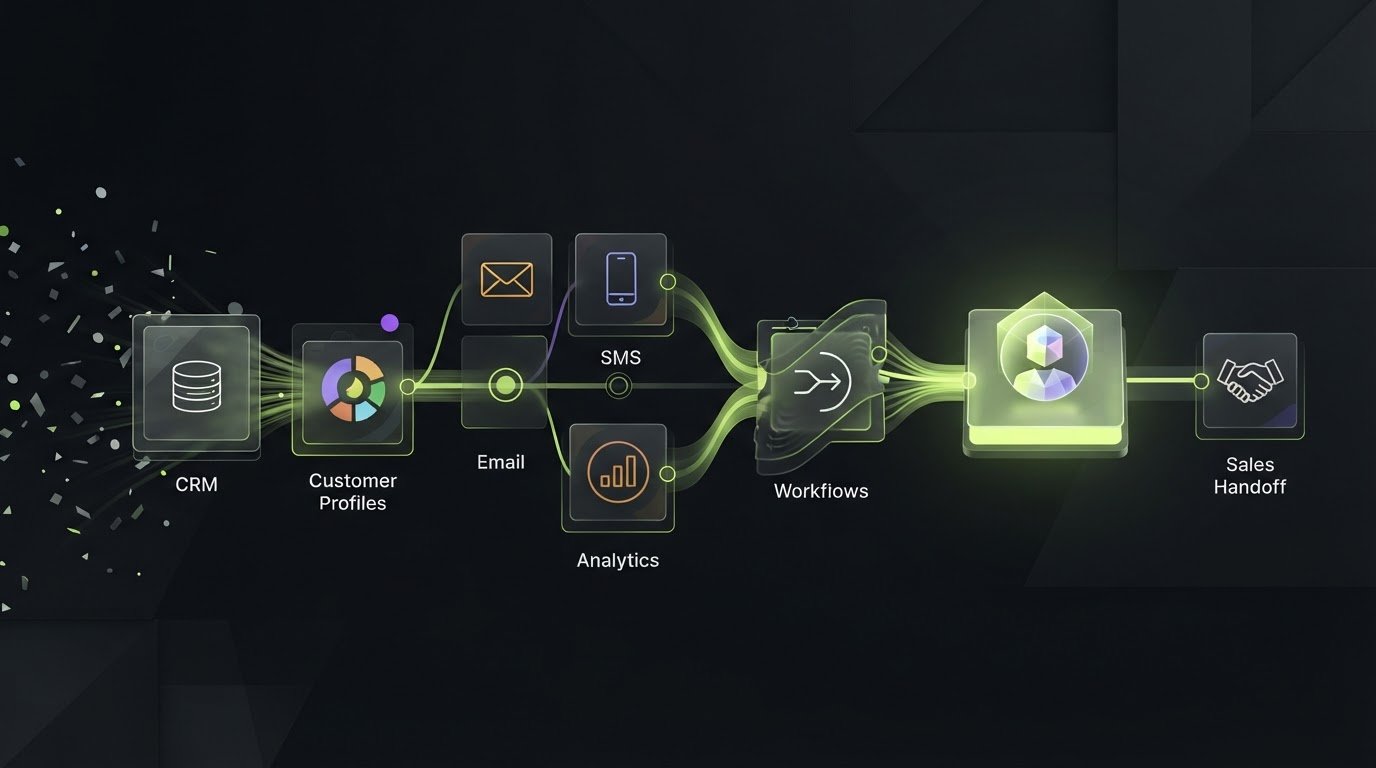
The platform with the longest feature list isn’t automatically the best fit. To work out how to choose a marketing automation platform, start with the job it needs to do: assess funnel coverage, customer profiles, email and SMS tools, and connections to your existing systems. Choose one that supports your workflow without adding complexity you won’t use.
It’s easy to focus on campaign features and overlook what happens behind the scenes. Automation only helps when customer information moves cleanly between marketing and sales, and people still need to guide leads towards a decision.
This comparison explains what marketing automation tools do and how their capabilities differ, from channel-specific tools to full-funnel platforms. It covers integrations, data consolidation, email and SMS automation, usability and room to grow, helping you compare options against real needs rather than a flashy feature list.
Key Takeaways
- Match the platform’s scope to the work you need done, from channel-specific campaigns to full-funnel automation.
- Prioritise a clean CRM connection so customer information and leads can move between marketing and sales.
- Compare how each option brings customer data together to support useful, joined-up profiles.
- Look beyond email and SMS sending: assess how each platform handles workflows, integrations and future growth.
- Use your team’s needs and intended use to narrow the shortlist, not the size of a platform’s feature list.
What are marketing automation tools?
Marketing automation tools run repeatable campaigns, messages and lead-nurture steps. They range from standalone platforms to marketing modules within CRM systems. Compare how each connects your tools and moves leads towards sales.
CRM integration and sales alignment
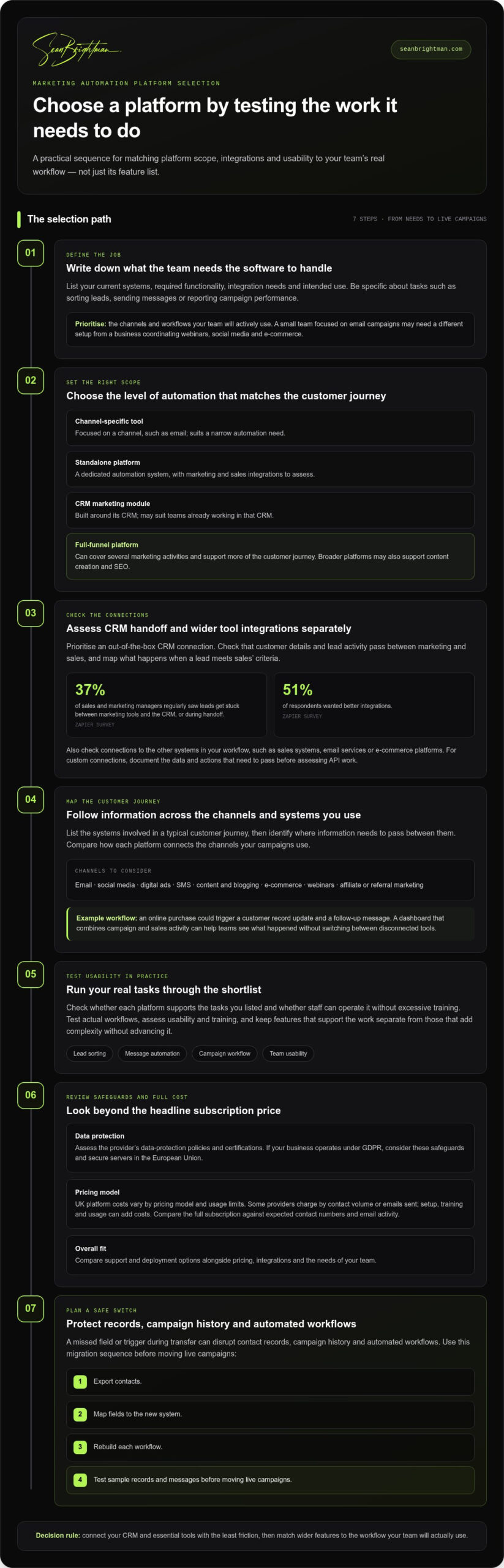
A CRM integration passes lead activity and customer details between marketing and sales, helping both teams work from shared information. A Zapier survey found that 37% of sales and marketing managers regularly saw leads get stuck between marketing tools and the CRM, or during the handoff. Prioritise an out-of-the-box connection with your CRM, then map what happens when a lead meets your sales team’s criteria.
Marketing automation can improve coordination, but it doesn’t replace people nurturing leads or converting them. A salesperson needs to see which campaign prompted a response, while marketing needs a clear signal when sales takes over. Compare the quality of this handoff, not just whether CRM integration appears on a feature list.
Marketing and sales tool integrations
Broader integrations connect campaigns with the tools your teams already use, such as sales systems, email services or e-commerce platforms. This differs from CRM alignment: the CRM connection supports the lead handoff, whilst other integrations let campaign data and actions move across the wider workflow. In a Zapier survey, 51% of respondents wanted better integrations.
List the systems involved in a typical customer journey, then identify where information needs to pass between them. An online purchase, for example, could trigger a customer record update and a follow-up message. A dashboard combining campaign and sales activity can help teams see what happened without switching between disconnected tools.
| Option | CRM integration | Connected tools | Best fit |
|---|---|---|---|
| Standalone platform | Often central to evaluation | Marketing and sales integrations | Teams needing a dedicated automation system |
| CRM marketing module | Built around its CRM | Often tied to the CRM ecosystem | Teams already working in that CRM |
| Channel-specific tool | Connection needs assessing | Focused on a channel, such as email | Teams with a narrow automation need |
| Full-funnel platform | Supports broader coordination | Can cover several marketing activities | Teams managing more of the customer journey |
Choose the option that connects your CRM and essential tools with the least friction, then match its wider features to your workflow.
UK platform costs vary by pricing model and usage limits. Some providers charge by contact volume or emails sent, while setup, training and usage can add costs. Compare the full subscription against expected contact numbers and email activity, not just the headline rate.
Switching can disrupt contact records, campaign history and automated workflows if a field or trigger is missed during transfer. Export contacts, map fields to the new system, rebuild each workflow, then test sample records and messages before moving live campaigns.
For connections beyond standard integrations, assess API access. An API can let your organisation link the platform with another app later. Before comparing custom integration work, document the data and actions that need to pass between systems.
Marketing automation features
Compare what each platform automates, which channels it covers, and how its features support your customer journey. Software your team can use in its actual workflow matters more than a long feature list.
Automation across marketing channels
Channel-specific tools focus on tasks such as creating and sending marketing emails. Middle- or bottom-funnel platforms focus on capturing leads and sending messages, while full-funnel platforms may also support content creation and SEO to build interest. The key difference is scope: a platform may serve one channel or connect activity across the journey.
Map the channels your campaigns use, then compare how each marketing automation tool links them. Automation may span email, social media, digital ads, SMS, content, blogging, e-commerce, webinars and affiliate or referral marketing. An e-commerce workflow, for example, might connect an online interaction with a follow-up message. Prioritise channels your team will actively use.
Features matched to business needs
Match features to your existing systems, required functionality, integration needs and intended use. A small team focused on email campaigns may need a different setup from a business coordinating webinars, social media and e-commerce. Compare platforms against those tasks instead of treating every available feature as essential.
Write down the tasks you want software to handle, such as sorting leads, sending messages or reporting campaign performance. Check whether the platform supports them and whether staff can operate it without excessive training. This practical test separates useful functionality from features that add complexity without advancing your workflow.
For a small business in the UK, prioritise essential channels, manageable workflows and features suited to the team’s intended use. A focused tool may fit narrower needs, while broader platforms offer more funnel coverage and room to scale.
Assess the provider’s data-protection policies and certifications, and consider secure servers in the European Union. Businesses operating under GDPR should review these safeguards when comparing platforms.
Shortlist platforms by documenting your current systems, required features, integration needs and intended use. Test the shortlist against real workflows, assess usability and training, then compare support, deployment options and pricing before choosing.
Finally, test how reporting connects activity to outcomes. Campaign reporting can help teams assess performance, while A/B testing compares two options to identify which better suits the audience. Check whether the platform can scale as users, communications and business activity grow. A feature that works for one campaign should also fit the wider operation.
Customer data consolidation and 360-degree profiles
A useful 360-degree profile brings sales and marketing information together, giving teams a clearer view of customer activity. In 2026, the best platform for your business is the one that unifies the data you use and supports the work your teams need to do.
Unified sales and marketing data
Look for a platform that brings customer details and interactions from sales and marketing together. A profile might combine email engagement, campaign responses and sales notes, giving teams a view across channels. What matters is how clearly the platform connects those records, not simply how many fields it can store.
Test a practical journey: a prospect opens an email, visits a product page and speaks with sales. Check whether the profile connects those interactions and gives each team relevant context. For a commerce business, viewing purchase activity alongside marketing engagement can help teams understand how a customer reached a decision.
Compare analytics and profile tools by asking what teams can do with the unified view. Can marketers segment audiences by engagement? Can sales see which emails or campaigns are relevant to a conversation? A platform that consolidates data but leaves teams unable to act on it offers storage, not a useful customer view.
Platform support
Customer support helps teams resolve platform issues and learn its features. Compare available channels, such as telephone, email and support tickets, and find out whether experts can help with technical problems. Support won’t build a customer profile, but it can help staff use the platform and troubleshoot a broken workflow.
Training matters too. Check whether corporate training comes with the subscription or can be added, and consider how much guidance staff need to manage segments, emails and analytics. A platform with extensive features may require more learning than a focused tool. Match the support model to your team’s experience and planned work.
Customer reviews and testimonials can offer evidence about how a platform performs in practice. Look for feedback relevant to your team’s size, use case and required integrations. A review about email campaigns may reveal little about consolidating sales and commerce data, so assess feedback against your specific requirements.
Look for recurring details in reviews, not isolated praise or criticism. Repeated reports of confusing analytics or slow support, for example, may flag issues relevant to your evaluation. Balance reviews with product demonstrations and a trial using sample records. Check how the platform handles duplicate contacts, missing fields and changes to customer details.
Use the same comparison for every shortlisted platform: profile completeness, data sources, analytics, support channels, training and customer feedback. Ask staff from sales and marketing to assess the same sample journey, then record where each platform gives them useful context. This makes differences visible without mistaking a polished dashboard for a complete customer view.
Choose the platform that turns connected customer information into useful context for both teams, with support and training suited to the work ahead.
Email and SMS automation
Email automation can create and send marketing emails, while SMS adds another channel to the customer journey. Compare what each platform can coordinate instead of treating message volume as the whole job.
Deliverability and spam risks
Deliverability is whether an email reaches its intended inbox. Unsolicited emails may be treated as spam, damaging the sending IP address’s reputation and future deliverability. Audience selection and message relevance are therefore operational requirements, not optional refinements. Check how a platform handles contact permissions, audience segments and suppression lists before building automated sends.
Test a real workflow before launch. Preview a purchase follow-up, for example, confirm the intended audience and inspect the message on different devices. Templates can speed up campaign creation, but still need accurate content and a relevant recipient list. Review sending and engagement reports after a campaign, then adjust the workflow if results show a mismatch.
Consent requirements
UK GDPR and PECR affect how businesses manage personal data and electronic marketing. Build automation around clear records of contact permissions and preferences, and ensure workflows respect changes such as an opt-out. This is separate from deliverability: an email reaching an inbox doesn’t establish that the recipient should receive it.
Before activating a sequence, map where contact details came from, which preferences apply, and how suppression updates reach each channel. Keep those records connected to the relevant contact so a later email or SMS doesn’t ignore a changed preference. The platform should support your processes; automation doesn’t replace them.
Email-only platforms focus on creating and sending email campaigns. Multichannel tools can coordinate activity across email and SMS, with broader options potentially including social media, digital advertising and e-commerce. Compare these features against your actual customer journey. A small team may need dependable email templates, while an enterprise operation may need to coordinate messages across several teams and channels.
For SMS, assess whether the platform supports your intended workflows and connects message activity to customer records. If WhatsApp matters to your strategy, assess it as a separate capability rather than assuming an email-and-SMS tool includes it. Map a service update or purchase follow-up, for example, and identify which channel should carry each message.
Use a practical comparison before choosing:
- Channel coverage: Match email, SMS and any required WhatsApp activity to your planned campaigns.
- Workflow control: Trace how a contact enters, progresses through and exits an automated sequence.
- Templates: Assess whether staff can adapt templates to the message and audience.
- Reporting: Check whether engagement data helps you improve later campaigns.
Choose email-only automation for a focused email requirement. Choose multichannel functionality when your customer journey genuinely needs coordinated messages across channels.
Marketing automation platform capabilities
Capabilities determine whether marketing automation software fits your operating model, not just your campaign plans. Compare workflow control, reporting, API access, scalability and pricing against the work your team needs to run.
A practical answer to how to choose a marketing automation platform starts with the tasks that need coordination. A campaign workflow might segment contacts, send a message and record engagement for later analysis. Check whether staff can adjust each step or whether routine changes require technical help. Advanced controls add value only when your team can use them.
Reporting should help you assess campaign performance and make decisions. Check which activity the platform tracks, how it presents results, and whether teams can use the insights to refine segmentation. A/B testing can compare two options, such as different messages, to identify which better suits the audience.
Test those capabilities with a realistic workflow before choosing. Build a campaign for a defined audience, compare two message versions, then review the reporting. This can reveal practical limits in configuration and analysis that a feature checklist misses.
API access is another capability worth assessing. It may let you link the platform with another app in the future, even if that connection isn’t part of your current setup. Identify the apps and data your organisation may need to connect, then assess whether the platform’s API supports that direction.
Scalability means the platform can handle growth in users, communications and business activity. Consider whether its features can support additional users, more complex workflows and changing campaign demands. A platform built around today’s narrow requirements may become a constraint if the organisation expands its channels or operating needs.
Pricing depends on how the provider charges and what the subscription includes. Some charge by contact numbers or emails sent; others may add setup, training or usage fees. Compare the full cost structure with expected usage, and check whether introductory rates change after the initial period.
- Workflow control: Can the team build and adjust the automation it needs?
- Reporting: Does the output support decisions about campaigns and audiences?
- API access: Can the platform link with another app as requirements change?
- Scalability: Can the features keep pace with greater activity?
- Pricing: Which usage limits and additional charges affect the subscription?
If you’re deciding how to choose a marketing automation platform, score each shortlisted option against these criteria using the same test workflow. Record where staff need training, where reporting falls short, and which costs change with usage. This turns a broad feature comparison into a practical decision based on your requirements.
If you need to turn platform requirements into a clear implementation roadmap, map your automation priorities.
Sean Brightman: AI Consulting
Sean Brightman’s AI Consulting can help assess where practical AI systems belong in your marketing operations and where they don’t. Turn to it when platform options are clear but AI priorities or next steps still aren’t.
Roadmapping can organise those decisions into a practical sequence, connecting your objectives with the capabilities and workflows you need to build. An Advisory Retainer provides ongoing strategic input as your plans develop. The focus is informed choices, not adding technology for its own sake.
If you’re weighing AI opportunities alongside your platform decision, visit seanbrightman.com to explore the next step.
Make your next move count
Turn your shortlist into a decision your team can act on. Agree what success should look like, who owns each workflow, and which trade-offs matter most. Then set a review point to assess whether the platform supports your marketing operation as it develops.
That’s the practical test behind how to choose a marketing automation platform: choose with a clear operating plan, not feature envy. If the decision also raises questions about marketing leadership, AI use or priorities, match the support to the problem. Sean Brightman offers Fractional CMO support, AI Consulting and Roadmapping for these distinct needs.
Bring the decision, the constraints and the next move into focus. Contact Sean Brightman to discuss what your organisation needs next.
A considered choice gives your team a stronger base to build on. Take the next step with clarity and keep moving.
Frequently Asked Questions
Customer support: Are there real experts ready to help, or does support feel like a lottery?
Reliable support means access to people who can diagnose platform issues, not just a library of help articles. Compare available channels, such as telephone, email and support tickets, and find out how technical issues reach a specialist. During evaluation, describe a realistic problem, such as a failed contact sync, and assess whether the response gives you a clear next step. Compare training options for the staff who’ll own the system too.
What features should a marketing automation platform include?
Choose features around the work you need to run. Core capabilities may include campaign workflows, audience segmentation, email automation, reporting and CRM connections. Add SMS, e-commerce triggers, A/B testing or API access where they solve a defined need. For example, a subscription business might prioritise renewal reminders and clear campaign reporting, while a small team focused on email may value straightforward templates and simple audience controls over advanced functions.
How do you assess integrations with a CRM, e-commerce platform, and analytics tools?
Trace a sample customer journey across your systems. Follow a test purchase from your e-commerce platform into the customer record, then see whether campaign activity and analytics reflect that event. Look for duplicate records, missing fields or delays in the information appearing. Repeat the exercise with a lead passed from marketing to sales. This practical test shows whether integrations support the decisions and tasks your teams rely on.
How easy is each platform to use, and what onboarding and customer support are available?
Ask the people who’ll operate the system to complete a familiar task, such as editing an email template or changing a workflow step. Note where they need help, then compare onboarding materials, training and support channels. A clear interface matters, as does the effort required to teach new staff. Include time for learning and administration in your comparison, alongside the platform’s features and subscription terms.
How much do marketing automation platforms cost in the UK, including contact and email limits?
UK costs vary by provider and usage. Some charge by contact volume or emails sent, while setup, training or usage fees may add to the subscription. Compare the full cost with expected contact numbers and email activity, not just the headline rate.